Product: Gidex
How to Withdraw Funds on Gidex (Hyperliquid)
Withdrawing on Gidex moves the USDC from your Hyperliquid trading account back to your own crypto wallet. The whole thing takes one quick signature — there is no on-chain gas transaction to send — and your funds usually arrive within 5 to 10 minutes.
This guide walks you through every step, from opening the withdraw window to confirming the transfer. Withdrawals are paid out in USDC on Arbitrum One, with a flat 1 USDC network fee.
Step 1: Open the Trade page and connect your wallet
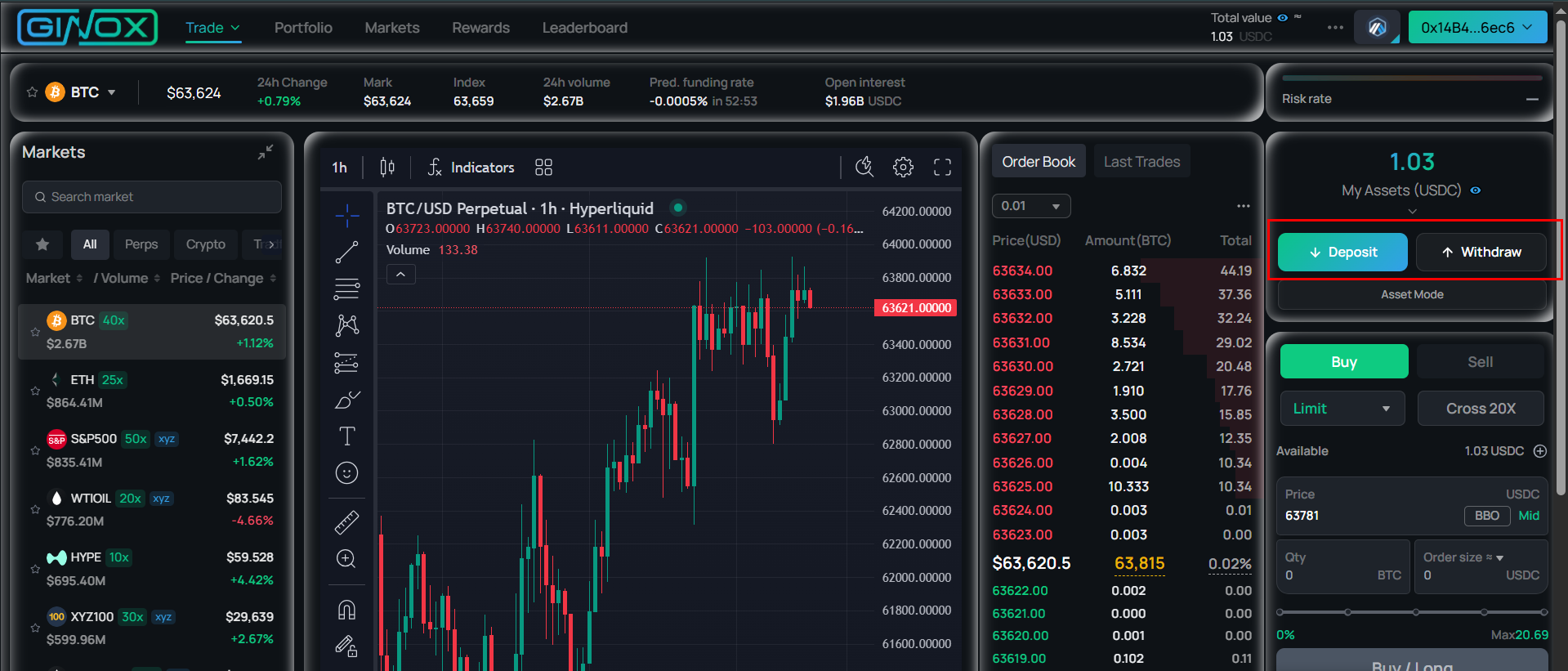
Go to app.ginox.io and open the Trade page (the Hyperliquid trading screen). If you are not connected yet, click Connect Wallet in the top-right corner and sign in. Once connected, your wallet address appears in the top-right and your account panel becomes available on the right-hand side.
Step 2: Open the Withdraw window
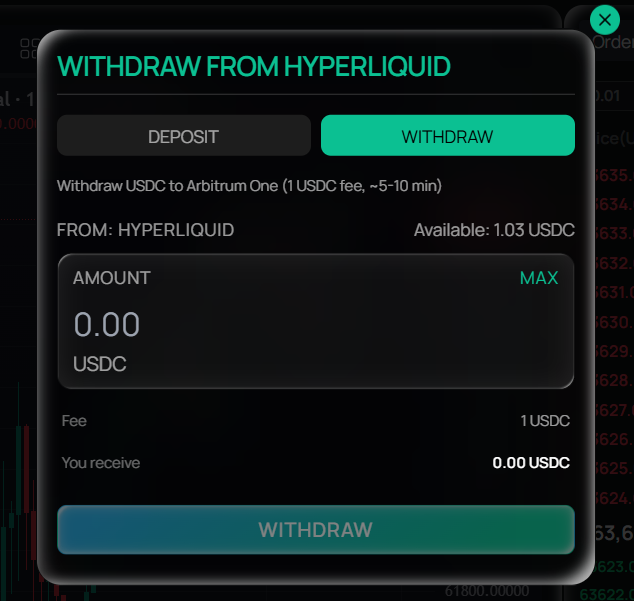
In the account panel on the right, click Withdraw (next to Deposit). A window titled “WITHDRAW FROM HYPERLIQUID” opens on the Withdraw tab. At the top it reads “Withdraw USDC to Arbitrum One (1 USDC fee, ~5-10 min)”, which confirms where your funds are headed and what the fee is.
Step 3: Check your withdrawable balance
The window shows two balances:
- Perp Balance (withdrawable): the USDC you can withdraw right now.
- Spot Balance: USDC sitting in your Spot wallet. Spot funds cannot be withdrawn directly — they must be moved to your Perp balance first.
If you have USDC in Spot and want to withdraw it, close the window, click Transfer in the account panel, move the USDC from Spot → Perp, then come back to Withdraw. Also note that any USDC being used as margin for open positions is not withdrawable until you reduce or close those positions.
Step 4: Enter the amount
Type the amount of USDC you want to withdraw, or click MAX to withdraw your full withdrawable balance. As you type, the window updates two values:
- Fee: a flat 1 USDC.
- You receive: your amount minus the 1 USDC fee. For example, entering 25 shows You receive 24.00 USDC. Because of the fee, your withdrawal must be more than 1 USDC.
Step 5: Confirm and sign
Click the WITHDRAW button. Your wallet opens a signature request — review it and click Sign. This signature authorizes the withdrawal; it is free and does not cost gas, because Hyperliquid processes the payout for you. If you reject the signature, the withdrawal is simply cancelled and nothing leaves your account.
Step 6: Wait for the funds to arrive
After you sign, Gidex submits the withdrawal and shows a confirmation message. Your USDC arrives in your connected wallet on Arbitrum One in roughly 5 to 10 minutes. You can close the window and keep using the platform while it processes.
Frequently Asked Questions
Which network do my funds arrive on? Hyperliquid withdrawals are always paid out as USDC on Arbitrum One. There is no chain to choose during withdrawal — the funds go to your connected wallet address on Arbitrum. If you want them on another chain afterwards, you can bridge them using the Gidex Bridge.
What is the withdrawal fee? A flat 1 USDC, deducted from the amount you withdraw. The “You receive” line always shows the net amount after the fee.
Is there a minimum withdrawal? Yes — your withdrawal must be more than 1 USDC, since the 1 USDC fee is taken out of it.
How long does it take? Usually 5 to 10 minutes from the moment you sign.
Do I need to pay gas? No. The withdrawal is authorized with a free signature, not an on-chain gas transaction. You would only need a little ETH on Arbitrum later if you decide to move the USDC somewhere else.
I have a balance but it shows 0 withdrawable. Why? Your USDC may be in your Spot wallet (transfer it Spot → Perp first), or it may be tied up as margin for open positions. Close or reduce your positions and move Spot funds to Perp, and the amount will become withdrawable.
Where do the funds go? To the wallet address you are currently connected with. Make sure you are connected with the wallet you actually control before withdrawing.
My withdrawal hasn’t arrived yet. Give it the full 5–10 minutes, then check your wallet on the Arbitrum One network and make sure you are viewing the USDC token. If it still hasn’t appeared after a while, contact Ginox support with your wallet address and the approximate time of the withdrawal.